Recognize Intent
Our app will encounter all kinds of messages in the real world. Recognizing users' intent is therefore difficult but crucial for user experiences. In this lesson, we'll learn how to detect intent from random text messages.
Time to accomplish: 10 minutes
Recognize Text
In the previous lesson, we used RegExp to recognize the add todo <name> command.
It's not very intuitive to use, and also really annoying when input.
So let's use a smarter way to recognize users' intent.
Edit handleChat handler like this:
- Messenger
- Telegram
- LINE
  // ...
      const { event, reply } = ctx;
      const intent = await getIntent(event);

+     if (intent.type === 'add') {
+       return reply(<p>Please enter new todo name:</p>);
+     }
      // ...

-     if (event.type === 'text') {
-       const matchingAddTodo = event.text.match(/add(s+todo)?(.*)/i);
-       if (matchingAddTodo) {
-         const todoName = matchingAddTodo[2].trim();
-
-         const { data } = await todoController.addTodo(event.channel, todoName);
-         return reply(
-           <WithMenu todoCount={data.todos.length}>
-             <p>Todo "<b>{todoName}</b>" is added!</p>
-           </WithMenu>
-         );
-       }
-     }
  //...
  // ...
      const { event, reply } = ctx;
      const intent = await getIntent(event);
      if (!event.channel) {
        return;
      }

+     if (intent.type === 'add') {
+       return reply(<p>Please enter new todo name:</p>);
+     }
      // ...

-     if (event.type === 'text') {
-       const matchingAddTodo = event.text.match(/add(s+todo)?(.*)/i);
-       if (matchingAddTodo) {
-         const todoName = matchingAddTodo[2].trim();
-
-         const { data } = await todoController.addTodo(event.channel, todoName);
-         return reply(
-           <WithMenu todoCount={data.todos.length}>
-             <p>Todo "<b>{todoName}</b>" is added!</p>
-           </WithMenu>
-         );
-       }
-     }
  //...
  // ...
      const { event, reply } = ctx;
      const intent = await getIntent(event);

+     if (intent.type === 'add') {
+       return reply(<p>Please enter new todo name:</p>);
+     }
      // ...

-     if (event.type === 'text') {
-       const matchingAddTodo = event.text.match(/add(s+todo)?(.*)/i);
-       if (matchingAddTodo) {
-         const todoName = matchingAddTodo[2].trim();
-
-         const { data } = await todoController.addTodo(event.channel, todoName);
-         return reply(
-           <WithMenu todoCount={data.todos.length}>
-             <p>Todo "<b>{todoName}</b>" is added!</p>
-           </WithMenu>
-         );
-       }
-     }
  //...
Then add these intents data in src/recognitionData.ts:
export default {
  defaultLanguage: 'en',
  languages: ['en'],
  intents: {
    greeting: {/* ... */},
    about: {/* ... */},
    yes: {/* ... */},
    no: {/* ... */},
    add: {
      trainingPhrases: {
        en: ['add', 'new', 'add todo', 'new todo', 'create todo'],
      },
    },
    list: {
      trainingPhrases: {
        en: ['todos', 'show todos', 'list todos', 'my todos', 'check todos'],
      },
    },
  },
};
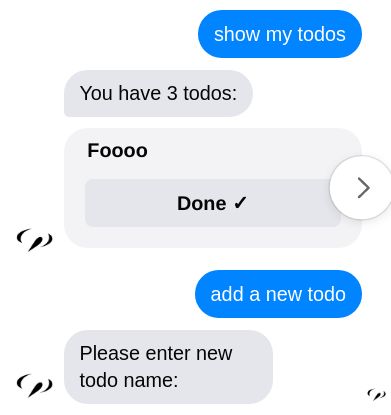
Now the bot can recognize simple instructions to list and add todo.
Like this:
info
The message need to match one of the trainingPhrases partially
while using RegexRecogntion.
Intent Recognizer
Let's look into useIntent services to see what happens.
Check the src/services/useIntent.ts file:
import { makeFactoryProvider, IntentRecognizer } from '@sociably/core';
import { ChatEventContext } from '../types';

const useIntent =
  (recognizer: IntentRecognizer) =>
  async (event: ChatEventContext['event']) => {
    if (event.type === 'text') {
      const intent = await recognizer.detectText(event.channel, event.text);
      return intent;
    }
    //...
  };

export default makeFactoryProvider({
  deps: [IntentRecognizer],
})(useIntent);
The intent is detected by the IntentRecognizer service. The
recognizer.detectText(channel, text) method returns result like this:
{
  type: "list",  // correspond to the intent name at `regresionData`
  confidence: 1, // confident level of the result, range 0-1
  payload: null  // raw data from the implementation
}
So we can reply according to the intent.type at handleChat.
Recognition Providers
At src/app.ts, you can see the IntentRecognizer is implemented
by RegexRecognition module:
import recognitionData from './recognitionData';
//...
    modules: [
      //...
      RegexRecognition.initModule({
        recognitionData,
      }),
    ],
    //...
You can switch to any intent recognition provider without changing the detection codes. For now two implementations are supported:
RegexRecognition- simple implementation byRegExpDialogFlow- powered by Google Dialogflow ES
caution
RegexRecogntion should only be used for development and debugging.
Consider using DialogFlow on production.
Our bot can recognize simple text messages now. Next, we'll learn how to make a complete conversation.